Creating a savegame editor for Commander Keen 6
This blog post is also available as a YouTube video:
Table of contents:
- Where to begin?
- Finding the game state in memory
- Parsing the game files
- Attacking the graphics data
- Decoding the sprites...
- ... as well as the tiles
- Opening up the executable
- Parsing the game maps
- Back to the savegame file
- A last look at the header
- The entity order mistake
- The spawning of new enemies problem
- The snap problem
- Savegame file format recap
- Updates
Where to begin?
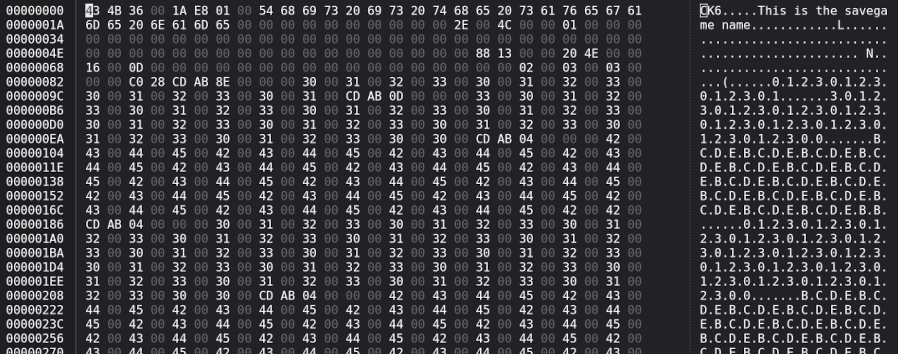
To start with reverse engineering the savegame file format, let's open one up in a hex editor, and see what it looks like inside. Here's an example from the 'Guard Post One' level:
Just for reference, in this blogpost I will be using version 1.5 of the game. Memory offsets will of course vary per version of the game.
At first glance, we recognize a couple things already. The file seems to start with a magic number
CK6<NULL>, we also see the title of the savegame I entered in the game, "This is the savegame
name", and we see a whole bunch of semi-repetitive or at least patterned data.
When we think about how the game behaves when loading a savegame, we know it restores it perfectly. When Keen, at the time of saving, was sitting down reading his book, in idle state, loading that savegame will have him in the exact same position. Same goes even if he is mid air, jumping around, the game will reconstruct that exactly.
When we consider the file size of an average savegame, around 15-25 kilobytes, we can assume that the game takes a snapshot of the current level, and dumps it integrally in the savegame. That would explain the massive amount of data present in the savegame.
First, let's focus on the easy and obvious values, things like amount of lives, ammo, ... In the example savegame I have 5000 (0x1388) points, three (0x03) lives left, and 22 (0x16) ammo.
It doesn't take long to find the score, but we have to be careful to swap the bytes around, because of
endianness. A value of 5000, or 0x1388 in hex, will be stored as 88 13 in the file. It is of course
right there in the header of the file, as well as our hex value 0x16 which represents the 22 ammo we have.
There's multiple values of three, so we are not sure yet which value represent the lives left.

Finding the game state in memory
While we could start manipulating bytes in the savegame, loading that save back in the game and see what changed, that can become a tedious process very quickly. Let's find these values in the memory of the game, while it is running. This way we can immediately see which values are changing, and what they represent.
After loading up the game in DOSBox-X, we need to do something first before we can go looking for memory. DOS memory addresses are in the form of segment:offset. This means we need to know which segment the game is working in, as some memory offsets will be made in reference to a specific segment.
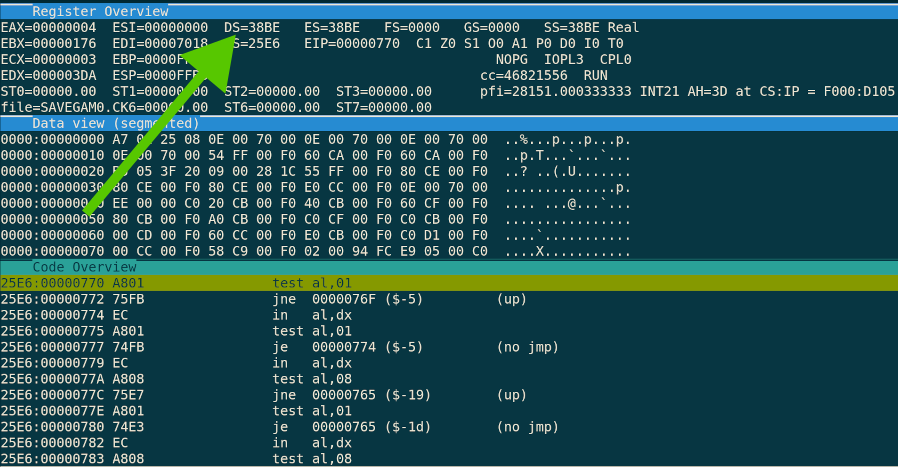
The easiest way to know the segment is to break into the debugger while the game is in a level, and take a look
at the DS register. This is not foolproof, however in this case it did yield me a consistent value of
38BE. If we're ever at a point where we need to investigate a near jump, we can always inspect the
DS register at that call site and adjust where necessary.
When we load up that memory segment, and we search for our score, the unknown value after that, up to the ammo
value (88 13 00 00 20 4E 00 00 16), we see we're in luck, as we do have a match.
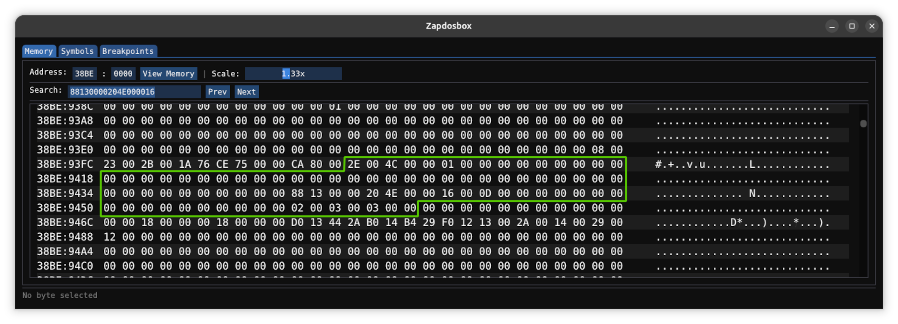
Not only do we find our three values, when we compare the entire block of data with our savegame, we see the entire chunk is there. The game does indeed copy this entire chunk of memory into the savegame.
The next step is now to play the game, shoot some bullets, lose some lives, and start mapping out what all these values mean, presuming they represent the game state. Keeping an eye on a flat piece of memory like that is a bit awkward. Let's just map all these values into a struct, and look at it like that. We'll start by just assigning 16 bit unknown names to all the values, except for the ones we know for sure, which is score and ammo.
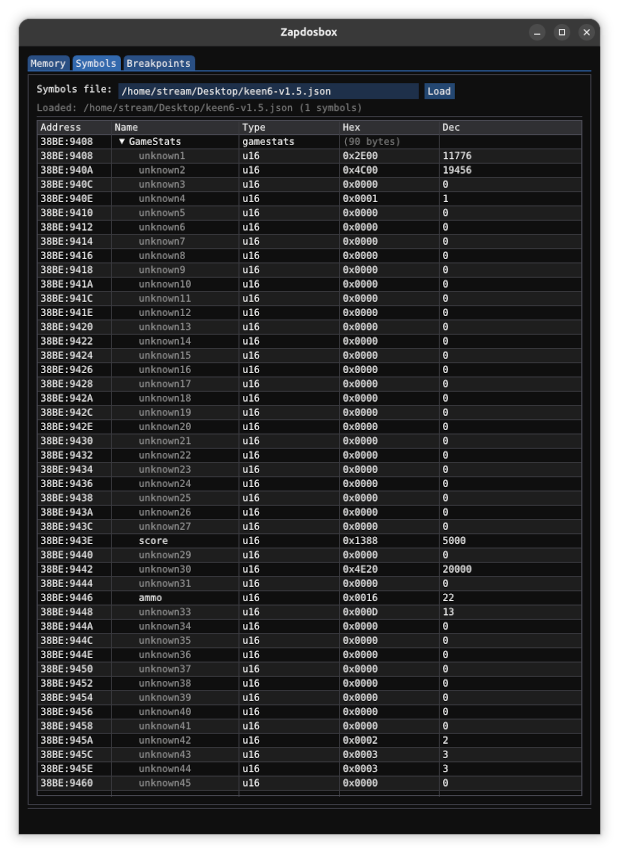
Now, with some gameplay we can deduce what most of the values represent:
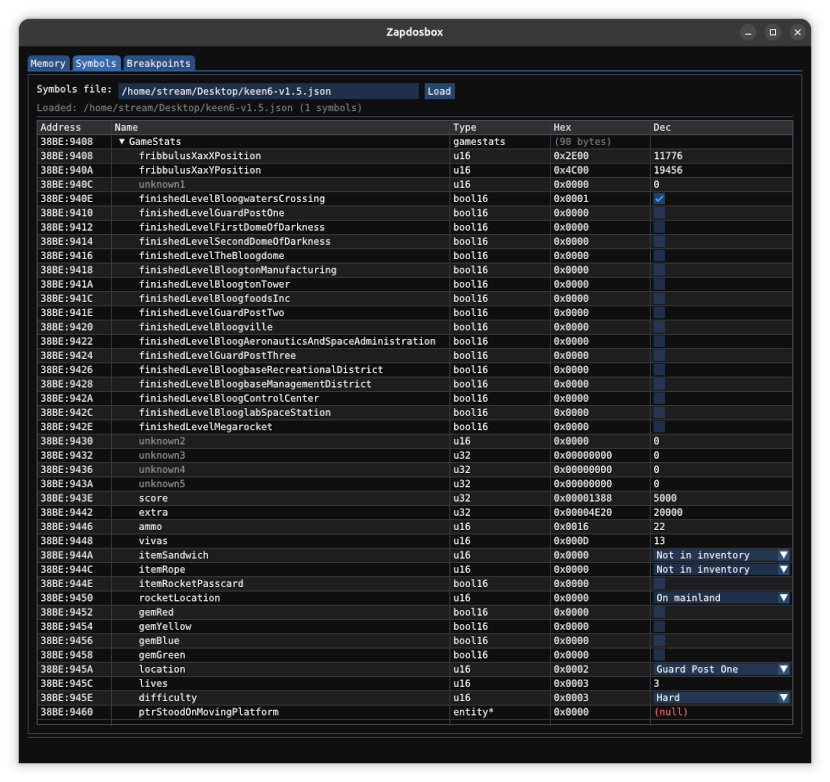
Let's go over the values, and see how I was able to determine what they were.
First, we have the Fribbulus Xax (the overview map of the game) x and y positions. While it might not be obvious yet as to why these resemble x and y positions, later on, when we investigate entities in the game, it will become more clear. However, we notice these two values only get set or updated as soon as we start a new level from the map. This also makes perfect sense, of course. When the game loads in a savegame, it needs to know where to put Keen on the overview map, in case you are in a level. After you exit the level, Keen is positioned right outside the just completed level. This is that x,y position.
Then we have an unknown, along with some other unknowns a bit farther down. I have not seen these values change during many playthroughs, they might be padding, unused, leftovers from unimplemented stuff, or I simply haven't found the trigger for them to change. When we force these values to e.g. 0xFFFF in the savegame, no weird behavior is noticed during gameplay, nor are the values zeroed out or changed in any way. They simply get loaded and saved along with the rest of the values.
Next, there are seventeen 'finished level' bool16 (a boolean stored as a 16-bit value). These simply get set as soon as you successfully finish a level. Note that the 'Bean-with-Bacon Megarocket' level also gets a boolean, even though you can revisit that level as many times as you want. The unknowns after the 17 levels might just be room for more level completion booleans.
See the updates section below for an explanation of what the unknowns are. Turns out they're not really unknown!
Many of the remaining values can be found in the game's status screen:
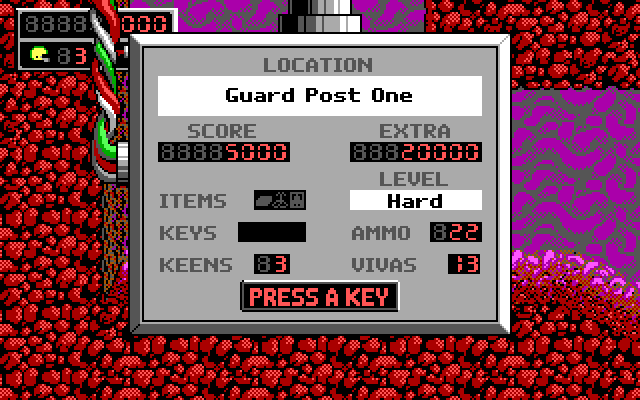
The rope and grappling hook, as well as the sandwich for Grabbiter are not just boolean values. While a value of one and zero mean respectively that you either have the item or not, the game needs to remember whether you used it on the map. That's when these values are changed to '2'.
The game also needs to remember where the rocket actually is. It can either be on the mainland or on the space station.
Finally, there's a pointer that was a little bit harder to figure out, namely the pointer to the platform you are currently standing on. It points to the platform entity itself, which we'll delve into later.
Parsing the game files
While we could end our savegame editor right here, just manipulating things like lives and ammo etc, I want to take it a step further and visualize the snapshot of the current level itself. We're not even sure what the rest of the data in the savegame represents, we're still going on the assumption that this is the tiles of the current level.
The way to determine whether this is the case is to parse the GAMEMAPS file, which contains all the pristine levels of the game. We can then see if that data resembles the unknown block of data in our savegame.
Luckily, lots of people (in particular Andrew Durdin) have worked on reverse engineering the Keen games, and level editors do exist, so how the levels are stored on disk is quite known. The information can be found on the Shikadi modding wiki.
There's two things we need to accomplish: extract all the tiles and sprites from EGAGRAPH, and decode the level files in GAMEMAPS.
Attacking the graphics data
The full details can be found on the wiki, but I'll give a concise overview on what I had to do to get the tiles and sprites out.
The EGAGRAPH.CK6 file consists of "chunks", which are individual items the game needs to access, such as sprites or tiles. To know where these chunks are located within EGAGRAPH, we use EGAHEAD. This EGAHEAD file is simply an array of 3-byte offsets. If you want to know where chunk 500 lives in the EGAGRAPH file, you load the 500th set-of-three-bytes in EGAHEAD, and you'll find your offset. That's quite easy to parse.
We can also figure out how many chunks there are by dividing the EGAHEAD file size by three. That's the size of our array of chunks.
It is important to note that each individual chunk is compressed with Huffman Compression. The Huffman table can be found in EGADICT.CK6. The implementation of the Huffman decompression algorithm is beyond the scope of this blog post, but not that hard to implement. You can find some details on the wiki about this as well.
To help with the Huffman decompression, each chunk (well, almost, as we'll see later) starts with a 32-bit value indicating the decompressed size of the chunk.
When we look at what the wiki has to say about the contents of the EGAGRAPH file, we see we have to skip a couple things first. Even though we know what the offsets of each chunk within the EGAGRAPH file are, we don't know which chunks represent what exactly. The list mentioned on the wiki is this:
- Picture table
- Masked picture table
- Sprite table
- Fonts
- Pictures (Unmasked bitmaps)
- Masked pictures
- Sprites
- 8x8 unmasked tiles (Single chunk)
- 8x8 masked tiles (Single chunk)
- 16x16 unmasked tiles
- 16x16 masked tiles
- 32x32 unmasked tiles (Optional)
- 32x32 masked tiles (Optional)
- Misc graphics (Optional)
- Game texts
- Demo files (Optional)
- Misc data (Optional)
The picture table, masked picture table and sprite table are easily skipped, they are just one chunk each. We do need to parse these, as they contain information we will need in a bit. The picture tables will for example give us information on how many pictures there are, and the sprite table the amount of sprites.
Both picture tables just consist of pairs of two 16 bit values, the width (divided by eight) and the height, one
set for each picture. We just divide the total chunk size by 2 * sizeof(uint16_t).
The sprite table consists of entries of 18 bytes long, so we do a similar calculation to the size of the chunk, to determine the amount of sprites in the file.
Then we have the fonts, which are stored in a variable amount of chunks, one per font. That means we have to parse the actual chunks and determine whether it is a font or not. Luckily the wiki has information on what the font format looks like, as well as a heuristic to determine whether we're dealing with a font or not.
Basically, a font starts with a 16 bit value, 64 zeroes and then the value 0x302. That's easy enough to detect and skip the font chunks.
Next are the pictures and masked pictures themselves, each in their own chunks. We determined the amount of each by looking at the size of the picture tables, chunks 2 and 3. These picture chunks can then be easily skipped as well.
Finally we end up at the sprites themselves.
Decoding the sprites...
We know how many sprites there are, we know the chunk index of the first sprite, now all we have to do is Huffman decode each chunk, interpret the graphical data and write the sprite out to a png file.
Of course, things aren't that easy. First of all, the data is not stored as r,g,b,a tuples, but rather as raw EGA data. The wiki has some information on how to interpret this raw data. It presents multiple options on how the data is stored, so we have to experiment a bit to find the correct one.
For Keen 6, it came down to 5 planes of data, stored one after the other, for respectively mask, blue, green, red and intensity. How to convert these b,g,r,i values to regular r,g,b is through a palette, as can be found on the wiki:
| Blue | 0 | 1 | 0 | 1 | 0 | 1 | 0 | 1 | 0 | 1 | 0 | 1 | 0 | 1 | 0 | 1 |
| Green | 0 | 0 | 1 | 1 | 0 | 0 | 1 | 1 | 0 | 0 | 1 | 1 | 0 | 0 | 1 | 1 |
| Red | 0 | 0 | 0 | 0 | 1 | 1 | 1 | 1 | 0 | 0 | 0 | 0 | 1 | 1 | 1 | 1 |
| Intensity | 0 | 0 | 0 | 0 | 0 | 0 | 0 | 0 | 1 | 1 | 1 | 1 | 1 | 1 | 1 | 1 |
| Result | 0 | 1 | 2 | 3 | 4 | 5 | 6 | 7 | 8 | 9 | A | B | C | D | E | F |
Pick the correct column that matches your b,g,r,i values, and the actual color is in the result row. The mask bits then of course determine the transparent pixels. One important detail about the the planar data for the colors is that 1 pixel does not take up one byte, but just a single bit. That's why the widths in picture and sprite tables will always be divided by eight. To decode you have to treat the values bit by bit, not byte by byte.
If you decode everything correctly, you should end up with all the sprites in the game!

... as well as the tiles
We don't really need to extract the 8x8 tiles, as per the wiki they are used for dialog borders and status windows etc... If you do want to decode these, you have to take into account that all masked 8x8 tiles and all unmasked 8x8 tiles are each in their respective chunk. Only two chunks for all these 8x8 tiles, so you have to determine the amount of tiles yourself, by looking at the total chunk size, and the size of either a masked 8x8 or unmasked 8x8 tile.
The 16x16 tiles are the ones we are after, as they will make up the levels themselves. Each tile is an individual chunk, but there are two major problems. The wiki casually mentions these problems as follows:
"These chunks do NOT have a dword specifying their decompressed size as this is hard-coded into the executable as a space saving measure. (As is the start and finish of unmasked and masked tile chunks.)"
First, for the Huffman decoding, we need to know how big the decompressed data is, otherwise the algorithm will happily keep decoding until it runs out of data. This information being hard-coded in the executable seems something that we'll have a hard time finding, which doesn't make things easy!
The second problem, not knowing where the masked tiles stop and the unmasked tiles begin (or vice versa!) is not that hard to solve. We know the width and height of the expected tile, so we only need to test whether there are four or five planes in the presented data. The unmasked tiles will not have a mask plane, so we just divide the chunk size by either four or five planes worth of data. Whichever of the two yields a round number indicates what we are dealing with.
Let's tackle the first problem, by looking in the executable.
Opening up the executable
Before we can even think of loading the Keen 6 executable in Ghidra, we need to decompress it. The game itself
is compressed with lzexe. Luckily, there's a unlzexe GitHub repo available which provides a
decompressor. Just compile the c file and decompress the exe, which we can now throw in Ghidra.
The assumption we make, to find our hard-coded decompressed chunk sizes is the following. The Huffman decompression routine in the game needs to know these sizes, otherwise it wouldn't have enough information on where to stop decompressing, just like our own Huffman decompressor.
If we can locate the Huffman decompression function in the game, we can see who calls this function and with which parameters (of which the decompressed size will be one).
Now, our problem becomes finding the Huffman decompression function. One piece of information from the wiki helps us with this. It mentions the Huffman dictionary being either embedded in the executable, or as an EGADICT file next to the executable. Even though I had my EGADICT file present next to the executable, it was worth a shot to see if that dictionary also existed inside the executable.
A simple search proved that the executable did indeed contain the copy of the Huffman dictionary, something the Huffman decompression function surely needed access to. Here they are side by side, in the executable in Ghidra, and EGADICT.CK6 in a hex editor:
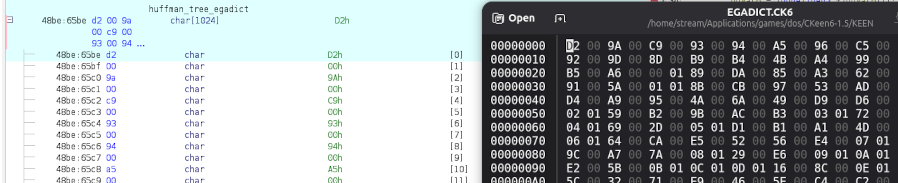
Looking up those bytes in the running game, a match was found at 38BE:65BE (notice the segment in
Ghidra being off by 0x1000). If we could put a watchpoint on that address, and see what the program counter
points to (registers CS:EIP), then we could see where this data was accessed.
Unfortunately, DOSBox-X doesn't appear to let me set a watchpoint, or a 'read-memory breakpoint', so we'll have
to create our own. When we look in the source code of DOSBox-X, we find that paging.h has three
interesting functions: mem_readb_inline, mem_readw_inline and
mem_readd_inline. These are to access a byte, word, and dword. Let's inject our own logging in that
function, dumping the program counter at CS:EIP while our specific address 38BE:65BE
is being read. We just have to convert the segment:offset address to a linear address, and compare
that to the address being accessed by the game. It's as simple as adding this to the functions:
    static LinearPt comparisonAddress = (0x38BE << 4u) + 0x65BE;
    if (address == comparisonAddress)
    {
        printf("mem_readw_inline read at %04X:%04X (CS:EIP)\n", SegValue(cs), reg_eip);
    }
Now we launch the game, and immediately we see the memory location being accessed many times, but always from the same spot.
mem_readw_inline read at 1A79:0361 (CS:EIP)
Knowing that Ghidra's segment was off by 0x1000, we can look at 2A79:0361, where we find ourselves
in a big function that does the Huffman decompression.
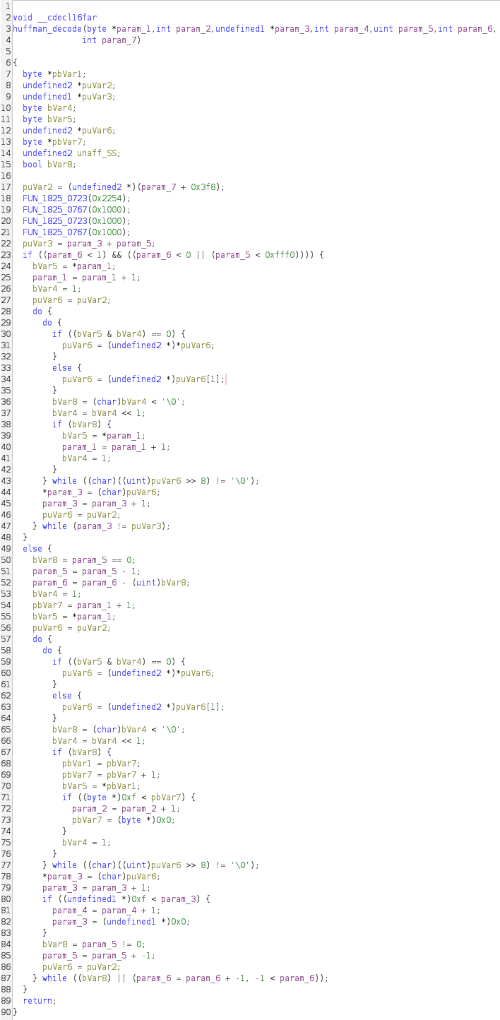
How do we know this is the Huffman decompression function? There are a couple indications, which require knowledge of how Huffman decompression works.
    if ((bVar5 & bVar4) == 0) {
        puVar6 = (undefined2 *)*puVar6;
    }
    else {
        puVar6 = (undefined2 *)puVar6[1];
    }
The occurrence of this pattern indicates the "going left" and "going right" in the Huffman algorithm. You'll see this happening twice, as there's a big if clause that divides this function in two. This is merely because of addressing reasons, both blocks perform the same Huffman decompression.
It's interesting to see that param_5 seems to be used as our decompressed size parameter. In the
if block the stop-decoding address for decompression is calculated in puVar3
being param_3 + param_5, and the exit condition is whether param_3, which is
incremented each loop is equal to our end position.
In the loop of the else-block param_5 just gets decremented and checked for it being zero, to exit
the loop.
All we now have to do is look at all the functions that call this decompression function, and see which value they pass for parameter 5! Ghidra neatly lists the higher-up functions that call this decompression function.

We see six callsites, in four distinct functions. When we take a look at the first, it becomes obvious that this is not what we are looking for.
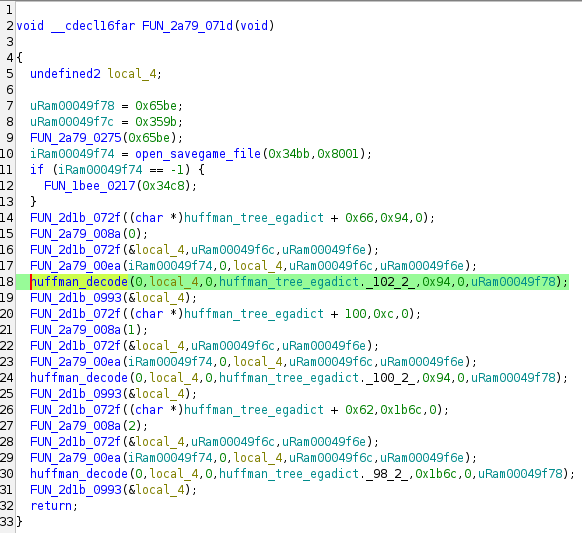
The fifth parameter, the decompressed size we are looking for, is a hard-coded value (0x94 in the highlighted line). While the next two of the three remaining callsites don't have hard-coded size values, the final callsite looks to be most promising:
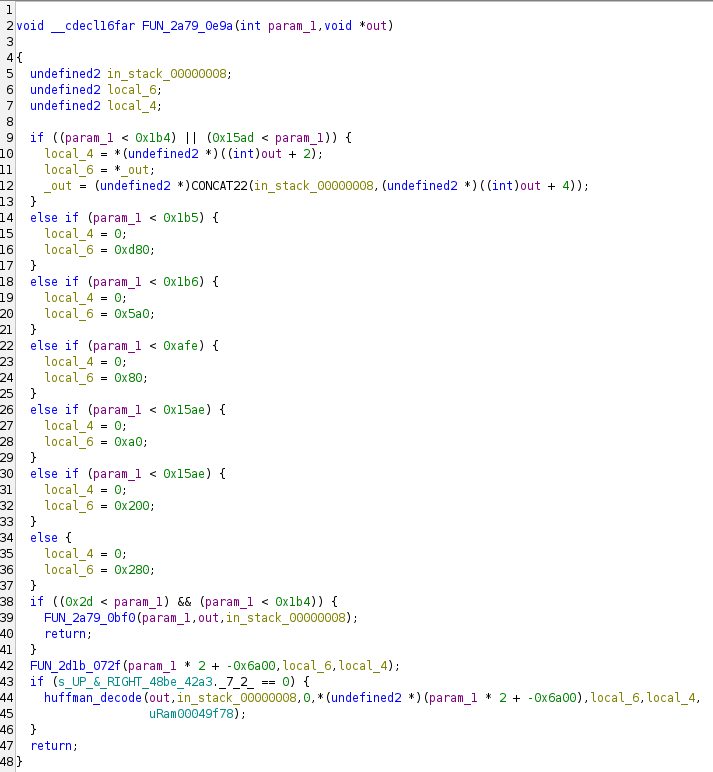
If we look at the call to the huffman_decode function at the bottom, we see that
local_6 is the parameter we are interested in, being the fifth parameter indicating our
decompressed size. When we look higher up, we see local_6 being set to various values, based on
what the incoming param_1 is set to. param_1 is then obviously the chunk index, this
is a get_chunk() function, where you pass in the chunk index and output buffer pointer, and it
Huffman decompresses the chunk for you.
Two interesting things to remark here. Remember, the 16x16 tiles not having the decompressed chunk length as the
first 16-bit value was the exception to the rule. All other chunks start with their size in EGAGRAPH. This can
be seen in the first if-clause, where local_6 is not set to a hard-coded value, but rather taken
from the first couple bytes.
Secondly, the game checks whether the requested chunk index (param_1) is less than 0x15ae twice !
(in lines 26 and 30). The second else-if block can therefore never be reached and is dead code. This is not a
misinterpretation by the Ghidra decompiler, the assembly shows the same pattern.
At this point, we have all the information we need to extract the 16x16 masked and unmasked tiles from EGAGRAPH. Decoding the graphical data is the exact same as the sprites with the added caveat, as mentioned before, that we need to determine the plane count, so we can choose between masked and unmasked.

Parsing the game maps
Again, we rely on the wiki for information about the GAMEMAPS file format.
Similarly to EGAHEAD, which contained all the offsets of the chunks inside the EGAGRAPH file, the GAMEMAPS file is indexed through a MAPHEAD file. Unfortunately, there was no MAPHEAD.CK6 file present in my version, so it has to be embedded in the executable.
The MAPHEAD data can easily be found though, as it starts with the magic word for the RLEW compression used to
decompress the level data. This magic word is 0xABCD, so we simply open the (lzexe uncompressed!)
executable in a hex editor and search for CD AB (swapped because of endianness!).
According to the wiki, the magic word is followed by a hundred 32-bit pointers/offsets into the GAMEMAPS file. Considering we only have around 17 levels in the game, we can assume the rest are zeroes.
There's three matches on CD AB in the executable, and the first two do not match our assumptions
above. The third one does.
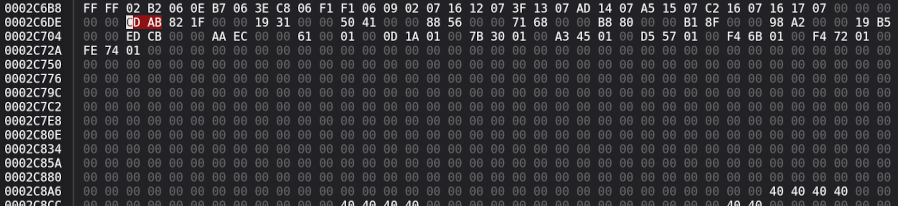
After the 100 GAMEMAPS pointers inside MAPHEAD we can find the TileInfo data, which we will leave for later.
Now that we have an offset for each level in the GAMEMAPS file, let's start parsing the data found at these offsets. Every level starts with a level header consisting of the following information:
- Three 32-bit values containing the offset within the GAMEMAPS file of the three compressed planes of level data
- Three 16-bit values containing the lengths of the three planes of data
- Two 16-bit values indicating the width and height of the level
- 16 characters containing the internal name of the level
There are three planes of data in each level. A background tiles plane, a foreground tiles plane, and an info plane. All three planes of data are double compressed, first with Carmack compression, then with RLEW compression.
How these compression schemes work is also beyond the scope of the blogpost, however you can find an implementation of both algorithms here.
Now, it's just a matter of decompressing the three planes twice, and visualize them. Each 16-bit value in the plane refers to the index of the tile. This is not the same as the chunk index however. The 16x16 tiles start in our case at chunk 438, so if the background plane refers to tile 0, that would be found in chunk 438.
While the background plane refers to the unmasked tiles, the foreground plane uses the masked tiles. To make things a bit more difficult, the tile numbers specified in the foreground plane reference the start of the masked tiles. As mentioned before, the start of the masked tiles is hardcoded in the game, but we had a solution for that. We just loop all the 16x16 tiles, and once the plane count shifts over from four to five planes, that is the reference index for our masked tiles. In our case here that is at chunk index 2815, that being the first masked tile.
If we subtract 438 (the first unmasked tile) from 2814 (the last unmasked tile), we know there are 2376 unmasked tiles in the game. Now, as an example, when the foreground plane mentions tile 0x4E1/1249 (the cockpit of the Bean-with-Bacon Megarocket), we know it only starts counting from the start of the masked tiles. So, to know the tile index within all 16x16 tiles, we add 2376. This tile can be found at tile index 3625, or if you want to know the chunk index, just add 438 to end up at chunk index 4063.
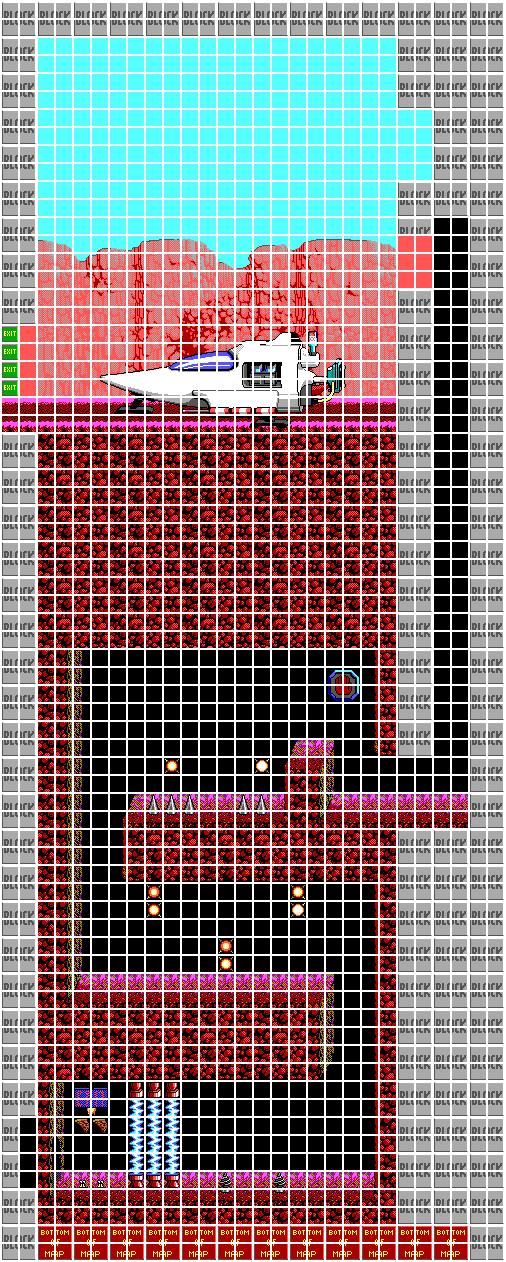
Now we can just paint the background plane first, and then the foreground layer on top:
Back to the savegame file
If we take another look at the savegame file, we notice something about the blob of data after the game state:
We see multiple instances of CD AB sprinkled all over this data. This is an indicator of RLEW
compression. And yes, when we try to decompress this data the same way we handled the GAMEMAPS levels, we find
that this data does indeed contain the three planes of the level. The only difference being that the savegame
does not have the double compression applied, there's no Carmack compression in play, just RLEW compression.
It's just the raw data of the planes though, nothing more. There's no header as there was in GAMEMAPS containing the level dimensions. So how do we know the level size, and thus the decompressed size of a plane, which we need for the RLEW decompression algorithm? Simple, in the game state we find the 'location' field, which contains the level ID. We simply make a lookup table of level dimensions, and we have all the information we need to decode the three planes.
The only things that are missing now is Keen and his adversaries (and all other sprites). When we see how far we have gotten in the file, after parsing the file header, game state and three planes of tile data, we see there's a bit of information left at the end. Surely that must contain information about all the sprite entities in the game.
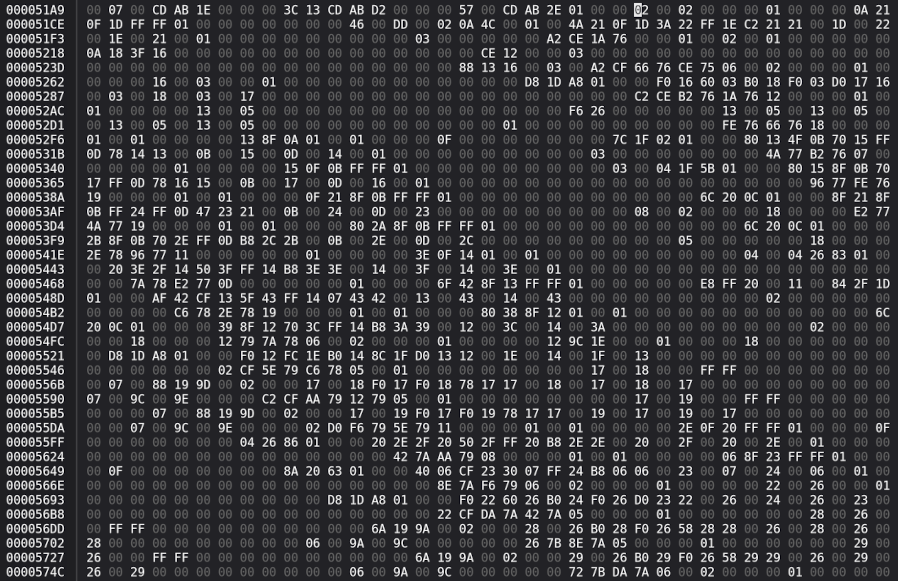
Above we see the final part of the savegame file, starting in this case at 0x51C2. We're assuming
this is going to be an array of sprite entities, and each entity would need to have several parameters
associated with it, such as its type, sprite ID, x and y coordinates, ...
What we'll do is load up the savegame, and search for this data in RAM. Again, we'll assign a struct to each entity, which will help us figure out what the fields of each struct represent. The only thing is, we have no clue how big this struct is, how many fields there are. If we look closely at the screenshot of the data above, we see random data, but in a way, it seems structured and organized.
This leads me to believe that all the entities have the same amount of fields, each struct is the same size. We can estimate the length of the struct by counting the amount of bytes between recurring patterns.
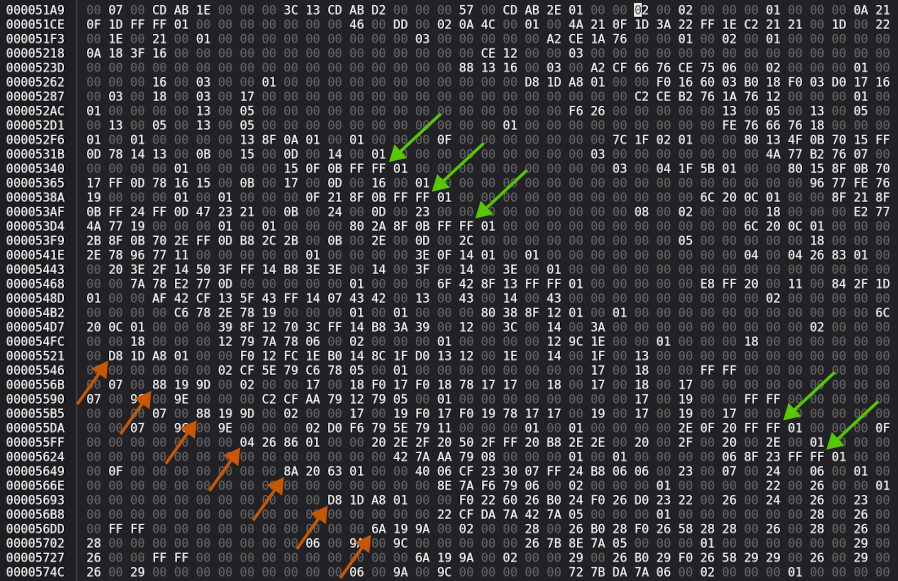
Notice how the green arrows are pointing to the values FF FF 01, always preceded by three non-zero
bytes, and followed by several zeroes. Or the orange arrows, they always seem to consist of three non-zero bytes
followed by a one or zero.
Now, when we measure the distance between all these arrows, something interesting comes up, It's always 76 bytes. This can't be a coincidence. There's a high chance of this being the sprite entity struct size.
Two more things we can test about this assumption. First, if we fill up this struct with 16-bit values, we see that exactly 38 of them fit in one struct (76 / 2 bytes per field). Of course, there are no guarantees that the struct is solely made up by 16-bit values, it gives us merely an indication.
Secondly, we look at how much space we have left in the file. In this example's case, the total file size is 23818 bytes, and the list of presumed entities start at offset 0x51C2 or 20930. This leaves 2888 bytes for the entities list, which if we divide this number by the size of what we think is one entity struct, 76, we get the round number of 38. This would imply this savegame file has 38 sprite entities in it.
When searching for the entity bytes of the savegame in RAM, after loading up the save, we find this batch of
data at address 38BE:75CE. It seems this chunk of data is integrally copied into the savegame file
without any compression. I've mapped several dozen entity structs onto that memory. This is the first one. Watch
the values change, when I move Keen around.
Click here to open the video in a new window
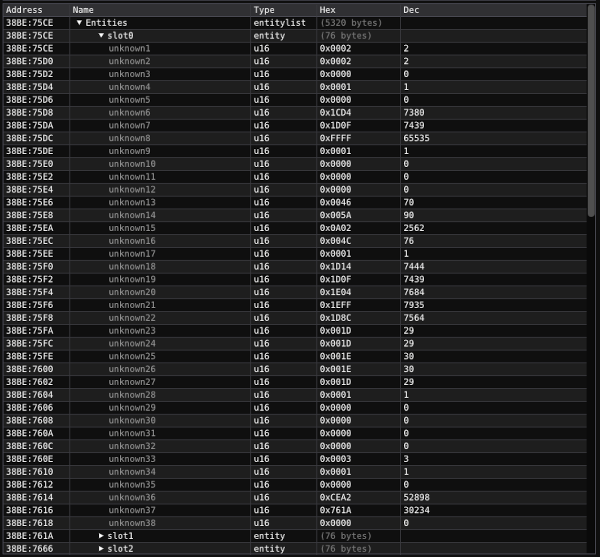
Apparently the first entity slot is reserved for Keen. There are quite a few values that change in response to walking and jumping around. It doesn't take long to figure out that unknown 6 and 7 are the x and y positions. They do seem to have high values though, around seven thousand where Keen is currently positioned.
A bit further down we see more numbers change according to position, but they are much lower values, in the twenties and thirties. Those however, we can already figure out. They're the tile coordinates. Now that we can render the layers of the level, we can easily look up tile coordinates, and they match up perfectly.
The tile coordinates are of course too coarse for tracking Keen's position. He would be jumping around tile per tile if that indicated his position. The large numbers representing the x and y position are simply the tile position times 16 times 16 (or times 256, of course). This gives a more precise coordinate system to position entities in the level.
In the middle of all the fields are 5 high precision coordinates and 5 tile position coordinates that all change when Keen moves. The high precision coordinates differ slightly from the x and y coordinates at the top. If we calculate the offsets of these values respective to the x,y coordinate we determine that these represent the hitbox of the entity. Both available in high precision, and in tile coordinates.
The other interesting part of this entity is in the last two unknowns, 37 and 38. For Keen's entity, in the first slot, these are 0x761A and 0x0000. Let's look at the values for the second slot:
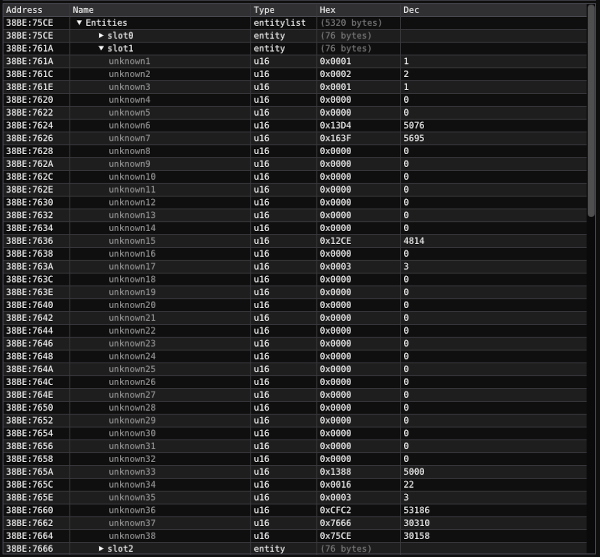
Ignoring the fact that even though this entity has x,y coordinates yet no hitbox coordinates (I believe this is the camera tracking entity), look at unknown 37 and 38 again. This time 38 is not null, but has a value. Let me draw some arrows to make these values help make sense.
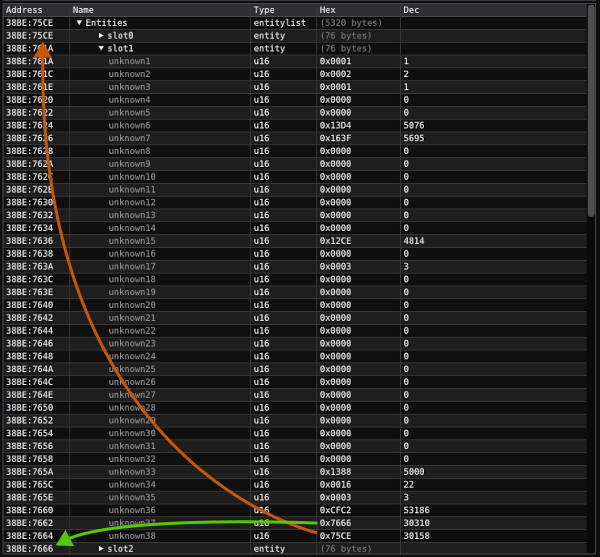
Unknown 37 points to the next entity slot, and unknown 38 points to the previous one. This of course creates a doubly linked list. It also makes sense that the Keen entity, in slot zero does not have a "previous" pointer (it was 0x0000), as it's the head of the linked list. The last entry in the linked list will then similarly have 0x0000 for its next pointer.
The fact that these prev and next pointers match up exactly to the slots we have allotted for each entity proves that our guess of 76 bytes per entity was correct. The two prev and next pointers are the last fields in each entity.
After playing around with the unknowns a bit, here's what I came up with what I think most of them represent.
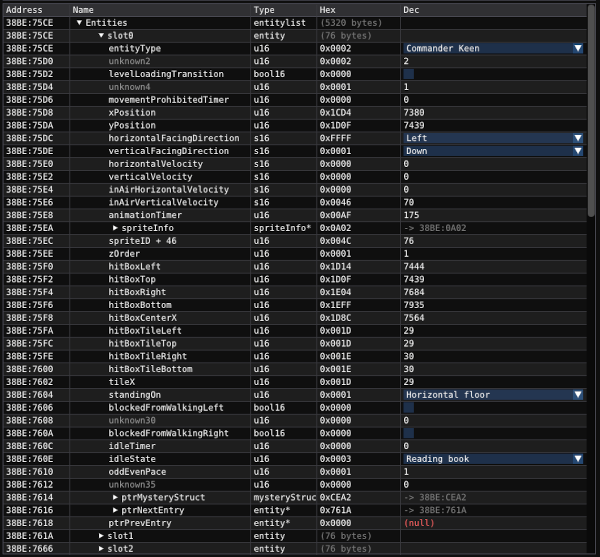
I guarantee there are mistakes in here (e.g. the in-air velocity, level loading transition etc), there are some mystery pointers in there as well, and it seems some entity fields have different meanings in different entities, or for example on Fribbulus Xax compared to in levels. While it is fun to figure out all these values, for the savegame editor, we mainly need type and position. The goal is to render the level with all entities in it, as well as to move entities around and create new ones.
We figured out the coordinates and hitboxes (which we need to position our entities in the level, and adjust them when moving entities around), and we figured out it's a doubly linked list, so it is now trivial to add new entities to the end of the list.
A last look at the header
Before we create our savegame editor, we need to take one look back at the file header. We know it starts with
CK6<NULL> and it contains the title you typed in the save screen, but there's some unknowns
in there as well.
To find out how many characters are reserved for the title, we can simply enter the longest string we can in the save game interface inside the game. My goto way of doing this is to put the entire alphabet in there.
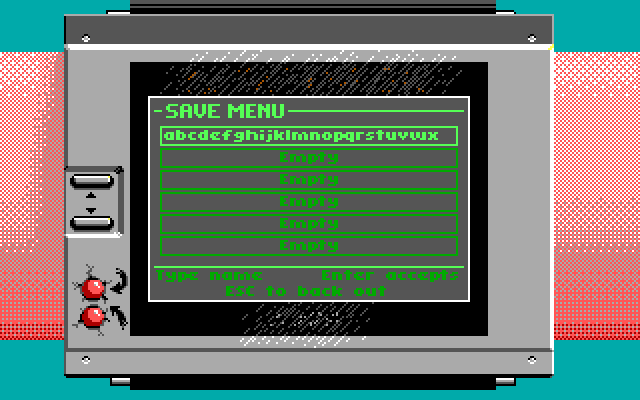
Looks like x is the final letter, that makes for 24 positions. But then, when I was testing other stuff, I saved my file with a title consisting of numbers 0123456789 multiple times, making it also easy to count.
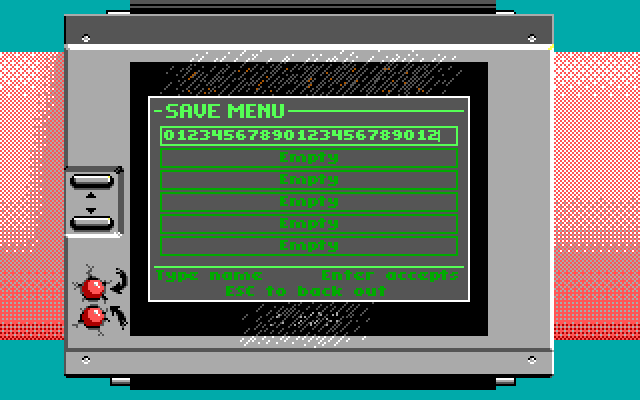
Suddenly, only 22 characters fit! Then, I realized that they are limiting the amount of characters not only by the buffer size, but also the width of the input field in the interface. No need for scrolling the input when the title is wider than the input field! Easiest solution to figure out the buffer max size is then to repeat as many thin letters as you can.
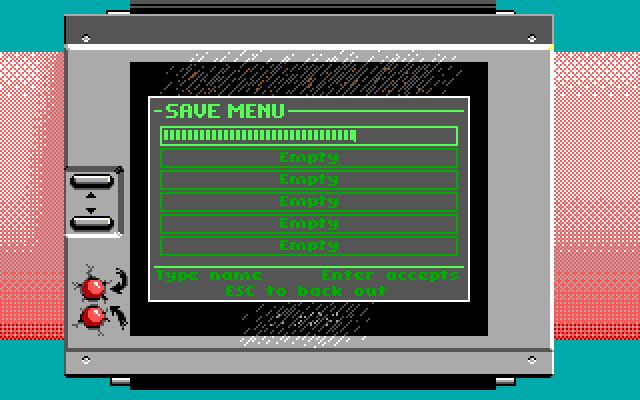

This is the max amount of L's the game lets me enter in the field, so that must be our max buffer size, 32
characters plus presumably a null terminator. This leaves one byte of padding before the game state struct
starts (40 29 00 3B ...).
Two unknowns left between the magic value CK6<NULL> and the first 'l' of our title. The first
value 1A E8, or 0xE81A is a file version. Opening a savegame file from game version
1.5 in version 1.4 or 1.0 is not possible, and vice versa. This number, which is hardcoded in the executable
prevents savegames from other versions being loaded. The numbers for the different versions are
0xA339 = v1.0, 0xA6C5 = v1.4, 0xE81A = v1.5.
The remaining 16-bit value between the version and the first 'l' of the title remains a bit of a mystery. In this example it is set to 1. I think this is only set to one when you "overwrite" a pre-existing savegame. If you save in an empty slot, this value is set to zero. If you overwrite a savegame slot, it is set to one. The question remains, why would they need to know this information. Even though it might have something to do with the following problem, I am still not convinced, as I can parse the entire savegame without issue, even ignoring this flag.
The entity order mistake
The mistake I made trying to parse out the list of entities at the end of the savegame file was the following. I wrongly assumed the entire block of memory from first to last entity in the list was dumped inside the savegame. That would mean there were either garbage entities or gaps between entities, but since the entire block could just be copied in memory at the same spot when restoring the game, those gaps wouldn't be an issue as the integrity of the pointers in the linked list would still be valid.
I would simply start at the entity list in the savegame, read the first entity, and look at its next pointer. To find the second entity in the savegame, I would calculate the relative offset in RAM, and use that to relatively offset inside the savegame. That way, garbage entities or gaps would be skipped.
The first problem I encountered was that sometimes, I would get entities with weird data in it. Granted, they
could be garbage data, or uninitialized memory, but some appeared after the last entity in the doubly
linked list (the one with a next pointer of 0x00).
After a while I realized that when saving, the game doesn't bother to rewrite the file on disk from scratch. It just opens the existing file if it exists, dumps the savegame contents, and that is it. If you have a level with 70 entities, as is the case at the start of Bloogwaters Crossing on easy difficulty, you get a file that's about 24.1 KB. Then, when you go to the map Fribbulus Xax, and overwrite the savegame file, the file size does not change, yet there's only 9 entities on the map.
This implies that you can't just blindly read in chunks of 76 bytes and load those as your entities, you have to respect the doubly linked list (as in, read until you encounter an entity that has 0 as its next pointer).
And yet, I still saw some garbage entity data, at least sometimes. When following the prev and next pointers in the savegame, the problem became obvious. The garbage data started as soon as there had been a gap in the entities. Instead of leaving the gaps inside the savegame, the game just runs through the doubly linked list and dumps them sequentially in the file.
My whole approach of relatively addressing RAM and savegame offsets was incorrect.
When restoring, the game knows exactly where the first entity goes. When reading all the next entities from the savegame file, it just needs to look at the prev pointer of the to-be-inserted entity, look that up in memory, and look at its next pointer. That will be the address the new entity needs to be written. Repeat until you encounter next ptr 0, and you're done. I did not verify in the disassembly that this is the exact way it works, but it seems reasonable to me.
So, if this is the way it works, why does the game need to know whether it's an overwritten savegame or a pristine save, by setting the flag in the header to 1 or zero ? If you follow the algorithm correctly, surely there is no chance to end up in potential garbage data left over from a previous save at the end of the file!
The spawning of new enemies problem
I wanted to make the savegame editor capable of placing new enemies in the level. An Orbatrix in Bloogwaters Crossing, for example. While adding a new Orbatrix entity in the doubly linked list is child's play, I encountered the following problem:

It seems the game crashes when you try to load a sprite it wasn't aware of. I assume the game only loads the sprites in memory that are defined in the third "info" plane for each level. The question is, which third plane? Either the one from GAMEMAPS containing the pristine levels, or the one that is supplied in the savegame file. If it were the latter, we could just add a spawn-point for a previously non-existing enemy inside the level somewhere, and it would pre-cache the sprites.
Unfortunately, after trying this, it doesn't work. It seems the game loads the possible enemies either from the GAMEMAPS spawnpoints, or there's a hard-coded list inside the game somewhere.
For now, I've solved it by only allowing the creation of new enemies that already exist in the level.
The snap problem
Adding new enemies to the level works simply by adding them to the doubly linked list, but for some types of enemies there's an extra problem. Some of them expect to be placed on solid ground. If you spawn them in air, the following will happen:
Enemies that can fly or jump don't have this problem, but most of them do need to be on solid ground to function correctly, so we need to create a "snap" function in the savegame editor to position new enemies (or dragged ones) on the floor.
We can simply look at the second plane of tile data, which represents our foreground tiles. There's an issue with that though.
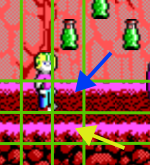
Both the blue arrow and the yellow arrow in the image above point to tiles that are on the foreground plane. If we just drop Keen's hitbox on the first foreground tile we vertically encounter, when dropping him from a height, he would be standing on the top tile. There has to be a way to determine whether a tile is fall-through or not. (Note, Keen is just an example in this situation, you can place him anywhere in the sky, and he will immediately start falling, he won't wiggle like the Bloog above).
The wiki has of course the answer for this problem. Remember when we were parsing the GAMEMAPS file, we needed the information from MAPHEAD to determine the pointers to the level data inside GAMEMAPS. After those 100 pointers is the TileInfo data. The wiki has an entire page devoted to this.
After the 100 pointers are several planes of data, consisting of 1 byte flags, with properties related to all the tiles. The wiki tells us the following planes are in play:
- UNMASKED: ANIMATION PLANE
- UNMASKED: NEXT TILE PLANE
- MASKED: TOP PLANE
- MASKED: RIGHT PLANE
- MASKED: BOTTOM PLANE
- MASKED: LEFT PLANE
- MASKED: NEXT TILE PLANE
- MASKED: PROPERTIES PLANE
- MASKED: ANIMATION PLANE
Luckily, we already know the amount of masked an unmasked tiles we have, so we can easily determine the sizes of all the planes, and skip right to the one we need, the masked (because we are interested in foreground tiles) TOP plane.
The TOP plane bytes indicate for each tile the following:
- 0: Fall through
- 1: Flat
- 2: Top → Middle
- 3: Middle → bottom
- 4: Top → bottom
- 5: Middle → top
- 6: Bottom → middle
- 7: Bottom → top
- 8: Unused
- 9: Deadly, can't land on in God mode
- ...
It defines whether a tile is flat, or which direction it slopes, but more importantly it also lets us know if a tile is fall-through. This is exactly what we need to make an enemy land in the right spot, when dropped.
The savegame editor is however not perfect, dropping/spawning a gravity-bound enemy on a slope might sometimes put the thing in the wrong position, and make it wiggle when loading. Best to place your enemies on flat ground.
Savegame file format recap
Here's an overview of the known and unknown data of the Keen 6 savegame file format:
| Field | Size (bytes) | Type | Info |
|---|---|---|---|
File header |
|||
| Magic | 4 | char[] | CK6<NULL> |
| Version | 2 | u16 | 0xA339 = v1.0 ; 0xA6C5 = v1.4 ; 0xE81A = v1.5 |
| File overwritten(?) | 2 | bool16 | |
| Title | 33 | char[] | 32 bytes plus null terminator |
| Unknown | 1 | u8 | Most likely padding |
Game State |
|||
| fribbulusXaxXPosition | 2 | u16 | X coord of Keen on the overview map before entering level |
| fribbulusXaxYPosition | 2 | u16 | Y coord of Keen on the overview map before entering level |
| finishedLevels | 2 x 25 | bool16 x 25 | 1 if the level has been successfully cleared, 0 if not |
| score | 4 | u32 | Total score |
| extra | 4 | u32 | Points needed for extra life |
| ammo | 2 | u16 | Neural stunner shots left |
| vivas | 2 | u16 | Amount of vivas caught |
| itemSandwich | 2 | u16 | Big Sandwich (0 = not in inventory; 1 = in inventory; 2 = used on map) |
| itemRope | 2 | u16 | Rope and grappling hook (0 = not in inventory; 1 = in inventory; 2 = used on map) |
| itemRocketPasscard | 2 | bool16 | Gives access to the rocket |
| rocketLocation | 2 | u16 | Position of the rocket on overview map (0 = on mainland; 1 = on space station) |
| gemRed | 2 | bool16 | Red gem/key in posession |
| gemYellow | 2 | bool16 | Yellow gem/key in posession |
| gemBlue | 2 | bool16 | Blue gem/key in posession |
| gemGreen | 2 | bool16 | Green gem/key in posession |
| location | 2 | u16 |
Current level
|
| lives | 2 | u16 | Amount of Keens/lives left |
| difficulty | 2 | u16 | Difficulty level (1 = Easy; 2 = Normal; 3 = Hard) |
| ptrStoodOnMovingPlatform | 2 | u16 | Entity pointer to platform stood on, or nullptr |
Tile planes |
|||
| plane 0 | variable | RLEW encoded background tile plane | |
| plane 1 | variable | RLEW encoded foreground tile plane | |
| plane 2 | variable | RLEW encoded info plane | |
Entities |
|||
| entity[] | flattened doubly linked list | See entity description below | |
And here's the fields inside an entity, with the big caveat that there are many fields I'm unsure of and might not represent what they are implied as here :
| Field | Size (bytes) | Type | Info |
|---|---|---|---|
| entityType | 2 | u16 |
These are known, there might be more:
|
| Unknown | 2 | u16 | |
| levelLoadingTransition | 2 | bool16 | On Keen, gets set when the level is loading, or when using the teleporter on Fribbulus Xax. Also flickers on when landing a jump. |
| Unknown | 2 | u16 | |
| movementProhibitedTimer | 2 | u16 | can't seem to reproduce this value changing, will update when found |
| xPosition | 2 | u16 | 256 times more granular than tile size |
| yPosition | 2 | u16 | 256 times more granular than tile size |
| horizontalFacingDirection | 2 | s16 | 1 = right facing; -1 = left facing; 0 = n/a |
| verticalFacingDirection | 2 | s16 | 1 = down facing; -1 = up facing; 0 = n/a |
| horizontalVelocity | 2 | s16 | |
| verticalVelocity | 2 | s16 | |
| inAirHorizontalVelocity | 2 | s16 | Probably incorrect, as the value seems to be half of horizontalVelocity |
| inAirVerticalVelocity | 2 | s16 | Probably incorrect, as the value seems to be half of verticalVelocity |
| animationTimer | 2 | u16 | A timer, perhaps linked to the sprite animation |
| ptrSpriteInfo | 2 | spriteinfo* | A pointer to a struct containing information about the current sprite (unexplored) |
| spriteID | 2 | u16 | The current sprite ID, but at an offset of + 45 |
| zOrder | 2 | u16 | Related to z-order, but probably incorrectly named |
| hitBoxLeft | 2 | u16 | The left side of the hitbox |
| hitBoxTop | 2 | u16 | The top side of the hitbox |
| hitBoxRight | 2 | u16 | The right side of the hitbox |
| hitBoxBottom | 2 | u16 | The bottom side of the hitbox |
| hitBoxCenterX | 2 | u16 | The horizontal center of the hitbox |
| hitBoxTileLeft | 2 | u16 | The left side of the hitbox, divided by 256 and rounded, resulting in the tile |
| hitBoxTileTop | 2 | u16 | The top side of the hitbox, divided by 256 and rounded, resulting in the tile |
| hitBoxTileRight | 2 | u16 | The right side of the hitbox, divided by 256 and rounded, resulting in the tile |
| hitBoxTileBottom | 2 | u16 | The bottom side of the hitbox, divided by 256 and rounded, resulting in the tile |
| tileX | 2 | u16 | The horizontal center of the hitbox (probably), divided by 256 and rounded, resulting in the tile |
| standingOn | 2 | u16 |
What the entity is standing on, probably incomplete
|
| blockedFromWalkingLeft | 2 | bool16 | Toggled on when the entity cannot move left |
| blockedFromJumpingUp | 2 | bool16 | Toggled when entity bumps ceiling and can't move farther up |
| blockedFromJumpingHigher | 2 | bool16 | Toggled on when the entity cannot move right |
| idleTimer | 2 | u16 | Counts up when Keen is not moving, maybe repurposed for other entity types |
| idleState | 2 | u16 |
Which state the current idle animation is in. For Keen:
|
| oddEvenPace | 2 | u16 | Seems to toggle while walking |
| unknown35 | 2 | u16 | |
| ptrMysteryStruct | 2 | u16 | A pointer to a struct containing positional data, not explored |
| ptrNextEntity | 2 | u16 | A pointer to the next entity in the doubly linked list (null if this is the last entity) |
| ptrPrevEntity | 2 | u16 | A pointer to the previous entity in the doubly linked list (null if this is the first entity) |
As you can see, a lot is still unknown or unclear, but there's enough there to create a savegame editor that allows you to move entities around, create some new ones, and manipulate all the game state's variables.
You can find the savegame editor here.
If you have any comments or questions about stuff I missed or misinterpreted, feel free to contact me on
Bluesky, X or email (kasper at zappatic dot
net).
I do intend to look at the other Keen games in the future, to incorporate them in the savegame editor. Follow me on my socials to keep up to date on the progress!

Updates
Update Aug 15th, 2026
The unknowns around the finishedLevels bool16 values in the gamestate have been removed. Instead of just the 17 levels that can be completed in the level, place is reserved for 25 levels. The fact that there was a single unknown bool16 before the first level makes sense. Bloogwaters Crossing has level ID 1. Level zero is the map, which cannot be completed.
The game therefore indexes into this array with the level ID's, explaining why the first finishedLevel bool never gets set.
Seems like they simply reserved space for 25 finishable levels.